
 All Courses


 5.0











Your first real website just lost half its clicks, and now you’re doubting everything you learned. Breathe. Google’s November 2026 core update started on 10 November, and plenty of student blogs and portfolios are swinging right now. At 99Eedu Institute, we wrote this Google core update recovery checklist for students, graduates and freshers. Seven steps. You’ll know what to measure, what to fix, and what to leave alone.
What should you do right now?
Export your Search Console data, wait until Google marks the rollout complete, then fix your weakest pages in order. That is the whole plan. Everything below explains how.
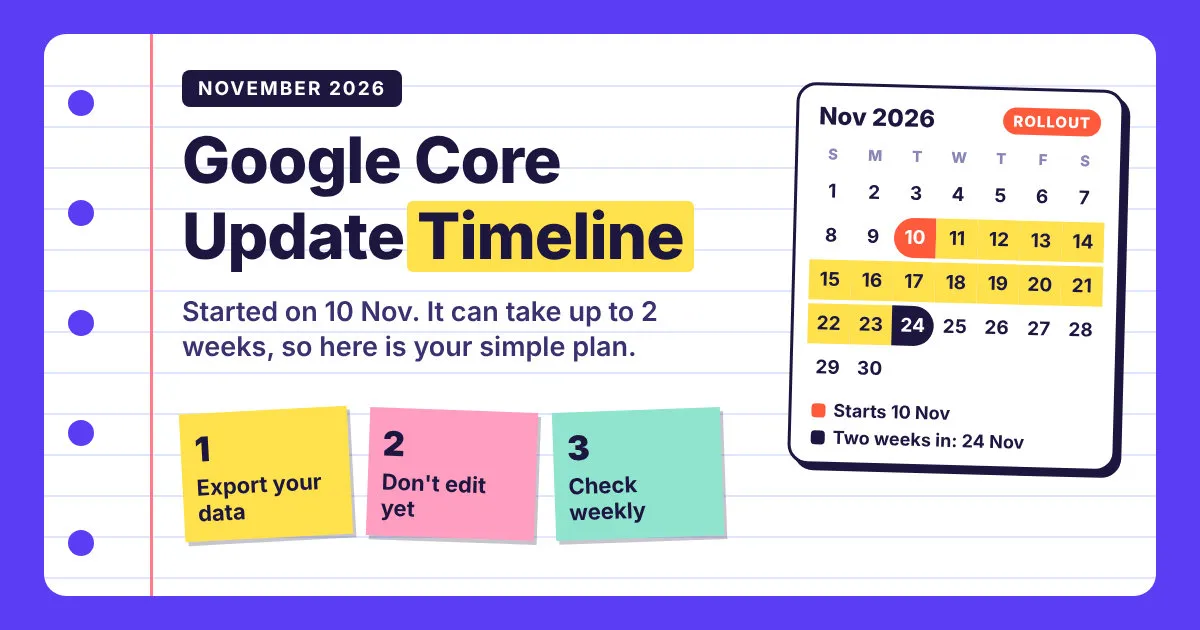
- Today: Save your 3–9 November numbers as a baseline.
- During the rollout: Change nothing big.
- One week after it ends: Compare, then sort the losers.
- After that: Rewrite, repair, restructure, and log every change.
What actually happened on 10 November 2026?
Google started pushing out its November 2026 core update on November 10, around 10:06 a.m. Pacific, and it applies globally across all languages. According to the Search Status Dashboard, the full rollout could take as long as two weeks. Google describes it as a regular update meant to show more relevant, satisfying content to searchers.
Here is what we know, based on the dashboard and trackers I checked on 23 November:
- It is the third broad core update of 2026, after March and May.
- It follows the September spam update, which ran from 24 September to 8 October.
- This is the eighth ranking update Google has logged on its Search Status Dashboard so far this year.
- The last two November updates ran for 25 and 23 days, so “two weeks” is an estimate, not a promise.
- SEO chatter has been quieter than usual.
- Google has not confirmed any specific site patterns, but SEO practitioners are flagging five worth checking. You will find them in Step 3.
This Google algorithm update in November 2026 also lands in a messy traffic season for students. Exam results, admission windows, and semester breaks all swing your numbers. Check the facts before you blame the algorithm. As of today, open the dashboard and see whether Google has posted a completion notice.
Is a core update a penalty?
No. A core update is a broad re-evaluation of how Google ranks pages, not a punishment aimed at your site. Some pages now look like better answers than yours. Your site is not being singled out. The one exception is spam, which is a separate issue, so check the five patterns in Step 3 as well.
How you interpret a traffic loss matters more than most people think. If you assume Google punished you, you will chase a single culprit. If you admit that other sites now serve readers better, you will spend your time upgrading your content instead, and that works.
| Core update | Spam update | Manual action | |
|---|---|---|---|
| Trigger | Broad ranking recalibration | Spam policy violations | A human reviewer’s decision |
| Where you see it | Ranking and traffic changes | Ranking and traffic changes | Manual actions report in Search Console |
| Typical fix | Improve overall usefulness | Remove spam tactics | Fix the issue, file a reconsideration request |
Check the Manual actions report once. If it says no issues, you can stop worrying about penalties and start working on quality.
Google core update November 2026: what to do in the first 48 hours
The first two days are for collecting information, not making changes. Take screenshots, save your data, and write down what you changed recently. This gives you clear proof of what happened, so you fix the right problem later and don’t waste time on the wrong one.
Here is my 48-hour list:
- Export Search Console Performance data for 3–9 November. Include clicks, impressions, average position, pages, queries and countries.
- Export the same report from 10 November onward.
- Open the Manual actions and Security issues reports.
- List every change you made in the last 60 days: new theme, plugin, template, domain move, mass publishing.
- Note the date your drop started.
Step five decides a lot. Picture a placement-prep blog whose traffic fell on 2 November. That is eight days before the update began. The cause is something else, maybe a broken sitemap or a theme change. Don’t waste a month rewriting content for the wrong problem.
How to recover from Google core update: the 7-step checklist
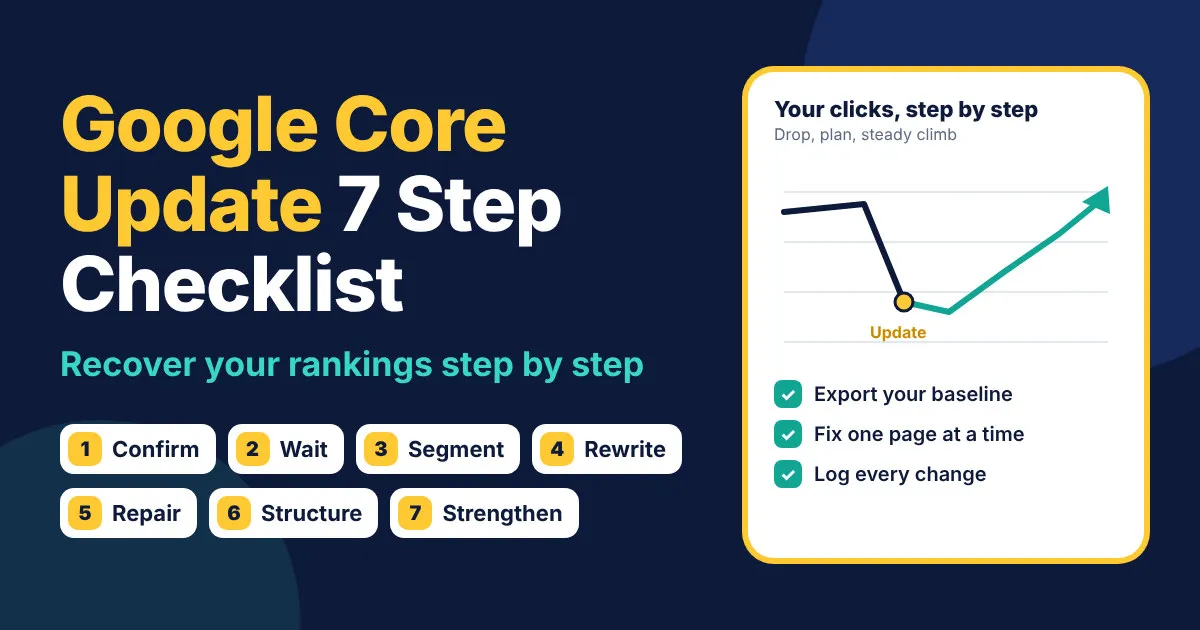
Work through seven steps in order: confirm, wait, segment, rewrite, repair, structure, and strengthen. Skipping ahead is the most common mistake we see in student projects. Each step has one action you can finish in a single sitting.
Step 1: Confirm the traffic drop is real
Compare equal time periods, then read clicks, impressions and average position separately. A genuine traffic drop after a Google core update usually shows lower positions on specific queries. A fake drop shows up everywhere at once.
I check these causes before touching content:
| Symptom | Likely cause | Action |
|---|---|---|
| Drop on all pages, same hour | Broken analytics tag | Test tracking |
| Impressions steady, clicks down | AI answers or a new SERP layout | Improve titles, add unique value |
| Seasonal topic fell | Exam or admission cycle ended | Compare with last year |
| Only a few queries fell | Competitors improved | Go to Step 3 |
| Pages vanished from Google | Indexing or technical issue | Go to Step 5 |
Use a 28-day comparison against the previous period, then a year-over-year view for seasonal topics. Write the result in one sentence: “Down 32% on 14 how-to posts, flat elsewhere.” A sentence like that keeps you honest.
Step 2: Wait, then measure
Wait until Google marks the rollout complete, then give it one extra week before you judge anything. Rankings bounce during a rollout. A page that sinks on day three can recover by day twelve.
Google core update recovery is a measurement problem before it is an editing problem. If you rewrite ten pages mid-rollout, you will never know which change helped. Google algorithm update recovery starts with patience. I know that sounds boring. It also stops you from breaking pages that were fine.
During the wait, do this:
- Check the Search Console Performance report every few days.
- Keep your baseline untouched.
- Fix only bugs, like broken links or a dead contact form.
- Draft improvements in a document, but don’t publish them.
Then compare the 28 days after completion with the 28 days before 10 November.
Step 3 Bonus: 5 site patterns to check while you sort your losers
As you group your lost pages, look for these five patterns. SEO practitioners are flagging them in this update. Google has not confirmed them, so treat this as a checklist, not a verdict. Google’s own announcement only says this is a regular update that can take up to two weeks.
Pattern 1: The same page, copied for every city
What it looks like: You offer tutoring, photography or freelance services. You write one page, then copy it ten times: “Digital marketing classes in Delhi,” “…in Pune,” “…in Jaipur.” Only the city name changes.
Why it is risky: Each page tells a visitor nothing new. Google may crawl all of them, but if they earn almost no impressions or clicks, they add no value. Mass-producing pages this way can fall under Google’s spam rules on scaled content.
What to do: Keep a city page only if it has something real, like a local example, a real photo, a real price or a real student story. Merge the rest into one strong page, and redirect the removed pages to the closest relevant page, not your homepage.
Pattern 2: Websites that look like copies of each other
What it looks like: AI tools make launching a site very easy. Some people build several sites for different businesses on the same template, with the same layout and writing style.
Why it is risky: When many sites follow one pattern, the pattern itself becomes a signal, and that can put the whole group at risk.
What to do: If you run a portfolio and a client site, or a blog and a side project, give each one its own design, voice and content. One template for everything is the shortcut to avoid.
Pattern 3: Making people dig for the answer
What it looks like: Someone searches “food calorie calculator.” Your page opens with four or five paragraphs of background, and the calculator sits at the bottom.
Why it is risky: The searcher came for one thing. If they have to scroll to find it, they leave, and that tells Google your page did not satisfy them.
What to do: Put the answer or the tool on the first screen. Add the explanation below it for readers who want more. Then open your top five pages on a phone and check whether you can see the answer without scrolling.
Pattern 4: Posts that do not belong on your site
What it looks like: A plumbing blog has posts on leaking taps, kitchen drains and water heaters. Then it publishes “Is Bitcoin a good investment?” to look broader and more authoritative.
Why it is risky: The post adds no real authority. It only makes your topic muddy, and it can look like faked expertise.
Student version: A placement-prep blog that suddenly posts celebrity news, or a resume-tips site with a random crypto post, has the same problem.
What to do: Stick to your topic. If a post does not fit, delete it or move it to a site where it does.
Pattern 5: Domains built only to match a keyword
What it looks like: An exact-match domain, or EMD, is a domain made from the search phrase itself, like emergencyplumberchicago.com. Some are “rank and rent” sites, where the owner builds a site, gets it ranking, then rents it to a local business.
Why it is risky: A keyword in the domain is not a problem on its own, and not every EMD gets hit. The risk is an EMD with nothing real behind it.
What keeps an EMD safe: Real reviews from real customers, real content about the business, and mentions of the brand on other websites. If you own an EMD, ask yourself honestly whether it has all three.
Your 20-minute self-audit
Open a spreadsheet and answer yes or no to each line:
- Do I have city or topic pages that are almost identical?
- Does my site look and read like another site of mine?
- Do my top pages show the answer on the first screen?
- Is every post on my site about my main topic?
- If my domain is a keyword, does it have reviews, real content and outside mentions?
A “yes” on the first, second or fourth line marks a group of pages to fix. A “no” on the third or fifth line is a gap to fill. Add each problem group to your change log in Step 7, so you can show the before and after later.
Remember the rule from Step 2: do not publish big fixes until Google marks the rollout complete. Use the waiting time to audit and draft.
Step 4: Rewrite for real value, not word count
Add what only you can add: first-hand experience, original examples, current facts, and a direct answer in the first two lines. Longer is not better. Useful is better.
Students often tell me, “I have no expertise.” You do. You sat the exam, finished the internship, survived the interview, used the tool. That lived detail is exactly what a faceless content farm cannot fake.
My rewrite checklist:
- Put the answer first, then explain.
- Add one example, screenshot or number you collected yourself.
- Replace vague claims with specifics and dates.
- Cut paragraphs that repeat an earlier point.
- Merge overlapping posts and redirect the weaker URL.
- Add a real author name, photo and short bio.
Before: “Resumes are important for freshers.” After: “Keep a fresher resume to one page, put projects above education if you have no work history, and list only tools you can explain in an interview.” The second version answers a question.
Real Google core update recovery usually comes from fewer, stronger pages. Resist the urge to publish thirty new posts.
Step 5: Repair technical and page-experience basics
Fix indexing errors, slow loading and broken mobile layouts first, because they quietly cap every other improvement. Great content on a slow, half-indexed page wastes your effort.
Open these free tools:
- Search Console, Page indexing report: find pages that are excluded or not indexed.
- PageSpeed Insights: aim for Largest Contentful Paint under 2.5 seconds, Interaction to Next Paint under 200 milliseconds, and Cumulative Layout Shift under 0.1.
- Mobile check: open your top five pages on a phone. Most of your readers likely do the same.
Then clean up the usual suspects. Compress oversized images. Remove plugins you don’t use. Fix broken internal links. Make sure each page has one canonical URL, HTTPS works, and your sitemap lists only pages you want indexed. Intrusive pop-ups on mobile? Remove them. We see student portfolios lose readers to a giant newsletter box before the first sentence loads.
Step 6: Structure pages so AI search can quote you
Generative Engine Optimisation, or GEO, means writing pages so AI answers can lift a clean, accurate passage and credit your site. Search no longer ends at ten blue links. AI Overviews and chat-style answers pull short passages, and they favour pages that are easy to extract.
I can’t promise a GEO ranking formula, because none has been published. These are best practices we apply:
| Element | What AI systems pick up | How to write it |
|---|---|---|
| Question headings | Matches the user’s wording | Use plain questions as H2 or H3 |
| Direct answers | A self-contained passage | Answer in the first sentence, 40–60 words |
| Tables and lists | Structured comparisons | Use them for steps, prices, differences |
| Definitions | Clear entity meaning | Define terms once, in simple words |
| Sources | Trust and verifiability | Name where facts come from and date them |
| Author details | Who is speaking | Show a real person with credentials |
Add Article, Person and FAQ schema if your platform supports it. Google has narrowed which sites see FAQ rich results, so add schema for clarity, not for a snippet. Keep facts consistent across your site, LinkedIn and About page. Mixed-up details confuse machines and readers.
One warning. Don’t write for robots only. Pages that read like a template get ignored by people, and people are still your best signal.
Step 7: Strengthen trust signals and log everything
Show who wrote the page, why they are qualified and where the facts come from, then record every change with a date. Trust is built on the page and off it.
On your site:
- A clear About page with real names.
- Author bios with relevant experience, projects or certificates.
- A working contact page.
- Citations to official sources.
Off your site:
- Publish a useful free resource, like a template, a checklist or a small dataset, that others want to reference.
- Share your work on LinkedIn, GitHub or YouTube under the same name.
- Ask your colleagues, mentors or communities for honest mentions.
- Never buy links. The September spam update just targeted that kind of shortcut.
Keep a change log in a spreadsheet:
| Date | URL | Change made | Reason | Result after 4 weeks |
|---|---|---|---|---|
| 2 Dec | /resume-tips | Rewrote intro, added example | Lost 40% of clicks | Check 30 Dec |
The log turns guesses into evidence. It also becomes proof of your skills, which I cover below.
5 Mistakes to Avoid After a Google Core Update
The five fastest ways to slow recovery are mass deletion, AI-spun rewrites, link buying, daily edits and panic redirects. I have watched each one cost people months.
- Mass deletion: Removing every page that dropped throws away pages that could recover. Improve or merge first.
- AI-spun rewrites: Pasting a post into a paraphraser adds no new value. Google core update recovery needs new information, not new wording.
- Link buying: It risks a spam problem on top of a ranking problem.
- Daily tweaking: If you change titles every morning, you can’t read the results.
- Panic redirects: Sending lost pages to your homepage confuses users and search engines. Redirect only to the closest relevant page.
One more habit to drop: checking rankings hourly. Your nerves will thank you.
Your 30-day plan for students and freshers
Spend week one measuring, week two diagnosing, week three improving, and week four tracking. A realistic Google core update recovery plan has to fit around classes, labs and part-time work, so each week asks for a few hours, not a few days.
| Week | Focus | Output |
|---|---|---|
| 1 | Baseline and checks | Exported data, Manual actions checked, change list |
| 2 | Diagnose | Losers grouped by page type, SERP notes, five-pattern audit done |
| 3 | Improve | Top 5–10 pages rewritten, technical fixes done |
| 4 | Track | Change log filled, new comparison started |
Time budget: about three hours a week is enough for a small site. Start with the single page that lost the most clicks. One finished page beats ten half-edited ones.
How long does recovery take?
Expect weeks to months, and sometimes you will only see movement at the next core update. Google’s own guidance says improvements may take time to show up. Some sites bounce back within a month. Others never return to old positions because the results page itself changed.
That is why Google core update 2026 recovery needs a long view. Judge progress by trend lines: more queries on page one, better click-through rate, steadier impressions. Not by one day’s number.
Turn your recovery into portfolio proof
A documented recovery gives you a case study that digital marketing recruiters genuinely want to see. Most freshers show certificates. Few show a messy problem they solved.
Use your change log to write a one-page story:
- The problem: “Clicks fell 32% after the November 2026 core update.”
- The diagnosis: which pages, which cause.
- The actions: what you rewrote, repaired and restructured.
- The result: numbers after 4 to 8 weeks, even if the result is mixed.
Share it on LinkedIn. Mention it in interviews. Honest results, including partial ones, sound more believable than a perfect graph.
Built for Students: Meet 99Eedu Institute
At 99Eedu Institute, you learn to bounce back from a drop in ranking by working with actual pages and not with slides. Our trainers guide you, and our CEO, Avijit Rath, has 15 years of experience in all of our training. You receive honest feedback on your work, and you see your progress in Google Search Console as you work.
Here is what you get:
- Hands-on practice: Export a baseline, find the pages that lost clicks, rewrite them and track the results in Google Search Console.
- Up-to-date lessons: Learn what Google currently says about core updates, snippets, AI answers and GEO.
- Honest guidance: We tell you what SEO can and cannot do. We never promise rankings or recovery.
- A portfolio you can show: Finish with a real before-and-after case study to share in interviews.
Meet Your Trainers
- Jaya Roy has 8 years of hands-on experience. She helps you plan, write and improve content that both people and AI tools can understand and trust. (LinkedIn Profile)
- Year Ali (Yeash) has 5 years of experience in SEO, Meta Ads and Google Ads. He shows you how organic search and paid ads work together when a traffic drop hits, including how snippets and zero-click results fit into a real marketing plan.
Both trainers teach from real projects, so you learn what works in practice.
About the Author
Year Ali (Yeash) is a trainer at 99Eedu Institute with 5 years of experience in SEO, Meta Ads and Google Ads. He teaches students and freshers how organic search and paid ads work together in a real marketing plan. Year writes in plain language and teaches from real projects, so every step you read here is one you can try today.
Connect: (LinkedIn Profile).
FAQ
Q1. How long does a Google core update take to roll out?
Google says up to two weeks, but the last two November updates ran 25 and 23 days. Check the Search Status Dashboard for the completion notice, then wait another week before judging your results.
Q2. Should I delete pages that lost rankings after a core update?
No, not by default. Improve, merge or update them first. Delete only pages with no traffic, no links and no purpose, and redirect them to the closest relevant page.
Q3. Can a brand-new student blog recover from a core update?
If your site is brand new, Google core update recovery doesn’t apply the way it does for older sites, because you have no baseline to return to. Focus on building instead: write a few helpful posts from your own experience, add real author details, and give it several months.
Q4. Can city pages or off-topic posts hurt my site after a core update?
Near-identical city pages and posts that have nothing to do with your main topic add little value, and mass-produced pages can fall under Google’s spam rules. Keep only the pages that give real, useful information, and merge or remove the rest.
Final thoughts
Export your 3-9 November baseline today, then fix one page at a time. A traffic drop feels personal, but it isn’t. Google reshuffled results for millions of pages. Wait for the rollout to end, run your worst-hit page through Steps 3 to 6, and log every change. Google core update recovery is slow, but you can learn it, and each step builds a skill you can show in an interview.
Sources checked on 23 November 2026: Google Search Status Dashboard, Search Engine Journal, Search Engine Roundtable, Rank Math, Keywords Everywhere and Momentic. Rollout details may change, so confirm on the dashboard.
Start Your Google Core Update Recovery Journey Today!
Ready to improve your website rankings? Learn practical Google core update recovery strategies with expert guidance from 99Eedu Institute. Book your free SEO counselling session today and take the first step towards stronger search visibility!
Share on:

Quick Enquiry
Please fill up the form and we will get back to you in next 12 hours!
