
 All Courses


 5.0











Your ads can win the click and still lose the report. That happens when tracking breaks, and Black Friday is the worst week to find out. This Meta Pixel Update checklist gives you five checks that protect your sales data: Pixel, Conversions API, deduplication, match quality and consent.99Eedu Institute wrote this guide for students, freshers and graduates who want to run Meta ads, or get hired to run them, with confidence. Black Friday falls on 27 November 2026. You have nine days. Start tonight.
What is the latest update on Meta?
Meta’s latest update: since 12 November 2026, the Meta Pixel counts some website purchases on shoppers’ own devices, and the setting is on by default. Advertisers can turn it off at any time in each dataset’s settings. Your reported sales may rise, so judge Black Friday on your store orders, not Ads Manager alone
Meta Pixel Update: The 5 Checks at a Glance
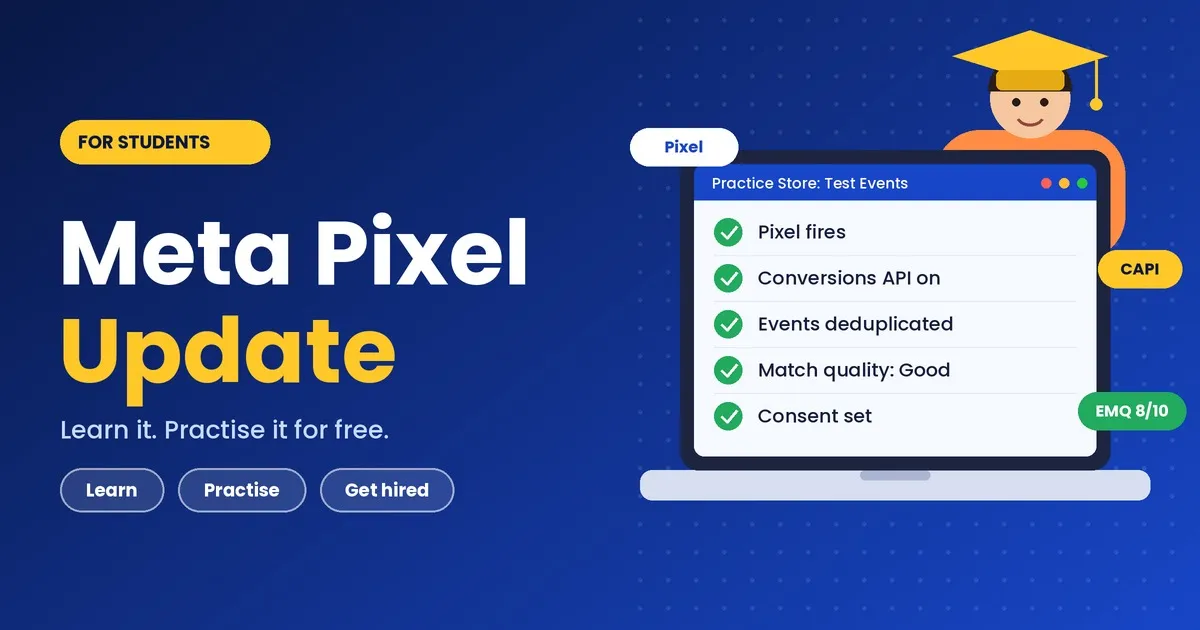
The five checks are: confirm your Facebook Pixel fires, switch on the Conversions API, deduplicate your events, raise your Event Match Quality, and lock your consent and attribution settings. Do them in this order. Each one builds on the last.
| # | Check | Where you do it | Time needed |
|---|---|---|---|
| 1 | Pixel fires on every key page | Meta Events Manager > Test Events | 30 min |
| 2 | Conversions API is live | Events Manager > Settings, or your platform | 1-3 hours |
| 3 | Events are deduplicated | Events Manager > Overview | 30 min |
| 4 | Event Match Quality is “Good” or better | Events Manager > Data sources | 1 hour |
| 5 | Consent and attribution are set | Your site banner + Ads Manager | 45 min |
Skim the table, then read the section you are stuck on. Every section starts with the answer, so you can leave once you have it.
What the Meta Pixel Update Changes for Your Black Friday Ads
The shift in this Meta Pixel Update is simple: Meta wants browser data and server data working together, so a Pixel-only setup leaves gaps that cost you money.
Browsers block cookies. Ad blockers strip scripts. Many iPhone users opt out of tracking. Each leak hides a real purchase from your report. Meta Ads tracking that starts from a thinner picture teaches the algorithm to chase the wrong people, and that means worse targeting and a higher cost per sale.
Black Friday makes this worse for two reasons:
- Volume spikes. One day of bad data teaches the algorithm the wrong lesson at the exact moment you are paying the most per click.
- Auctions get expensive. Competition raises costs, so wasted spend hurts faster.
I treat the next ten days as a tracking audit window. Fix the plumbing first.
Five terms to know (interviewers love these)
- Meta Pixel: a snippet of code on your website that reports visitor actions from the browser.
- Conversions API (CAPI): a connection that sends the same actions from your server straight to Meta.
- Event: one action, such as ViewContent, AddToCart, InitiateCheckout or Purchase.
- Event Match Quality (EMQ): a score Meta gives each event showing how well it can link the event to a real Meta account.
- Deduplication: Meta’s method of counting one action once when it arrives from both the browser and the server.
Check 1: Confirm Your Meta Pixel Fires on Every Page That Matters
Open Meta Events Manager, select your Pixel, go to Test Events, enter your site URL and click through your own store; if ViewContent, AddToCart, InitiateCheckout and Purchase do not appear, your Meta Pixel tracking is broken. Do this before anything else.
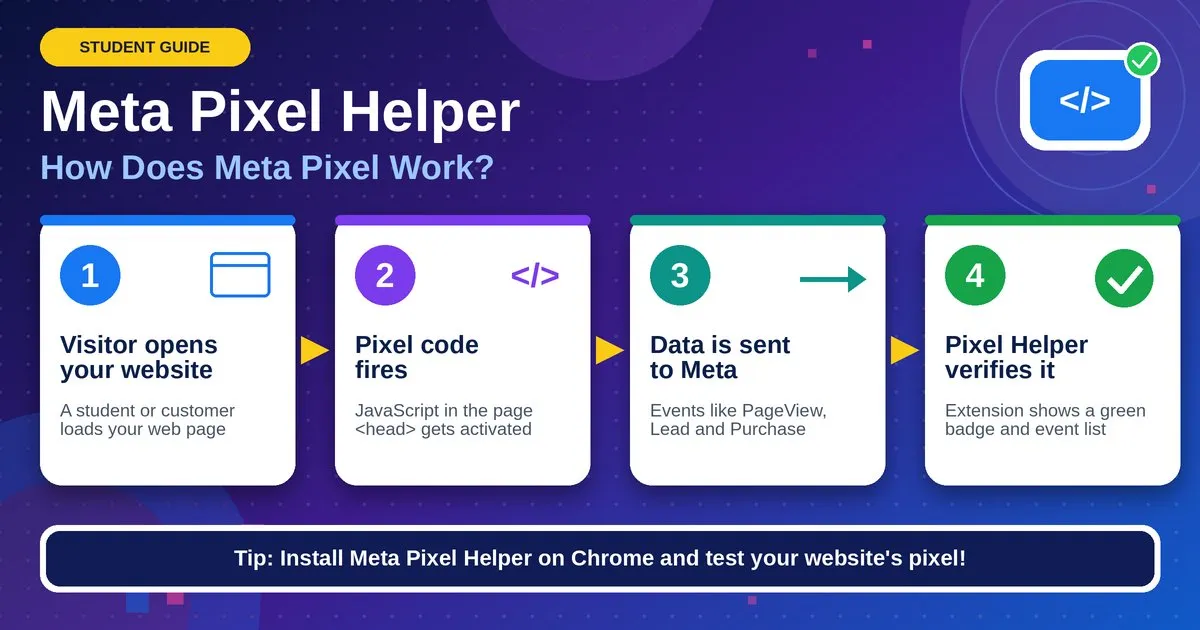
I have seen the same four mistakes again and again. Learn them, and you will spot problems faster than most working marketers.
- The Pixel loads twice. Two copies of the code cause double-counted events. Install the free Meta Pixel Helper extension for Chrome and look for a warning.
- The Purchase event fires on the wrong page. It should fire on the order confirmation page only, once per order. If it fires on page refresh, your revenue looks inflated.
- Value and currency are missing. A Purchase event without a value tells Meta nothing about revenue. Send the amount and an ISO currency code, such as INR or USD.
- A theme or app update silently removed the code. This happens a lot after store redesigns.
How to test in five steps:
- Open Events Manager and choose your Pixel.
- Click Test Events and paste your store URL.
- Open the site in the new tab Meta gives you.
- Visit a product, add it to the cart, start checkout, and place a test order or use a sandbox payment.
- Watch the events appear live. Click each one and confirm the value, currency and content IDs look right.
One point trips up beginners. A Facebook Pixel tracking test only proves the browser side works. It says nothing about your server. That is the next check.
Student shortcut: you do not need a client to practise. Open a free trial store on Shopify, or install WooCommerce on a free WordPress site, add one fake product, and run this exact test. Screenshot every step. That screenshot set is your first portfolio piece.
Check 2: Turn On the Conversions API Before the Sale Starts
Turn on the Conversions API through your platform’s built-in integration if you have one, because it takes minutes, while a manual server setup takes days and is risky to attempt during a sale. Shopify, WooCommerce, Wix and most large store builders offer a native Meta connection that includes Conversion API support.
The typical order of difficulty looks like this:
| Method | Difficulty | Best for |
|---|---|---|
| Platform integration (Shopify, WooCommerce plugin) | Easy | Small stores, students, freelancers |
| Conversions API Gateway | Medium | Stores with some technical help |
| Server-side tagging (e.g., through a tag manager) | Medium-hard | Agencies, larger brands |
| Direct API code | Hard | Developers with custom sites |
Meta Conversions API vs. Pixel: which one do you need?
You need both. The Pixel is fast, simple and captures on-page behaviour. The Conversions API is steadier because it does not depend on the visitor’s browser. Running them together gives Meta the widest view of your buyers.
| Meta Pixel | Conversions API | |
|---|---|---|
| Where data comes from | Visitor’s browser | Your server |
| Blocked by ad blockers | Often | Rarely |
| Setup effort | Low | Low to high, depending on method |
| Sees offline or CRM events | No | Yes |
| Recommended alone? | No | No. Use both. |
Two warnings from experience:
- Do not change your setup in the last 72 hours before the sale. If something breaks, you will have no time to find out why. Treat the weekend before Black Friday as a code freeze.
- Do not switch off the Pixel after turning on the API. The two work as a pair, and the next check explains why.
To confirm it works, open Events Manager and look at the Overview tab. Each event should show a label such as “Browser” and “Server” beside it. Seeing both means the connection is live.
Check 3: Deduplicate Events, So You Do Not Count Every Sale Twice
Deduplication works when your browser event and your server event share the same event name and the same event ID, because Meta then counts them as one action instead of two. Skip this, and a ₹2,000 sale can show up as ₹4,000 in your report.
Meta matches the pair using:
- event_name (for example, Purchase), and
- event_id (a unique code for that single action, such as the order number).
If both signals carry the same values, Meta keeps one and discards the duplicate. Meta applies this matching within a window of about 48 hours, so send both signals close together.
How to spot a dedup problem:
- Your Purchase count in Meta is much higher than orders in your store admin.
- Events Manager flags a low “deduplication” or “event ID coverage” figure.
- Your reported return on ad spend looks too good to be true. It usually is.
How to fix it:
- Pick a unique ID for each action. The order number works well for purchases.
- Pass that same ID in the Pixel event and in the server event.
- Re-run your Test Events session and place another test order.
- Compare the Purchase count in Events Manager with your store’s order list.
If you use a platform integration, the platform usually generates the ID for you. Still verify it. I never trust a setup I have not tested myself.
Interview-ready line: “I check that the Pixel and Conversions API send matching event names and event IDs, then compare Meta’s Purchase count against actual orders.” Say that to an employer, and you will stand out from candidates who only know how to boost a post.
Check 4: Raise Your Event Match Quality Meta Score
Event match quality Meta is a score from 0 to 10 that shows how well Meta can connect an event to a real person, and you raise it by sending more customer information parameters, such as hashed email and phone number. Higher scores usually mean better ad delivery and more accurate reporting.
Find it here: Events Manager > Data sources > your Pixel > Overview > select an event (Purchase is the one that matters most) > look for Event match quality. Meta labels the result Poor, OK, Good or Great. Aim for Good at minimum on your Purchase event.
Which customer details help most?
| Parameter | What it is | Notes |
|---|---|---|
| Customer’s email address | Strongest single signal. Meta needs it hashed (SHA-256). | |
| Phone number | With country code | Normalise first (digits only, include +91 or the right code). |
| External ID | Your own customer or order ID | Helps link repeat buyers. |
| fbp and fbc | Meta’s browser and click identifiers | Pass them from the browser cookie to your server events. |
| IP address and user agent | Device information | Send with every server event. |
| First name, last name, city, state, zip | Extra matching details | Small boosts, but they add up. |
Rules I follow every time:
- Clean before you hash. Lowercase the email, trim spaces, then hash. A single stray space produces a different hash and breaks the match.
- Collect what you legally can. Ask for phone and email at checkout, with a clear consent notice.
- Turn on Advanced Matching for the Pixel in Events Manager settings so the browser also sends hashed customer data.
- Fix the weakest event first. If AddToCart sits at Poor and Purchase sits at Good, leave Purchase alone and lift the cart event.
A note on expectations: a low EMQ on pages where visitors are anonymous, such as product views, is normal. You rarely have an email at that point. Focus your effort on events that happen after the visitor gives you details, like checkout and purchase.
Practice task for students: open any store you have access to (even your own test shop) and write down the EMQ for each event before and after you add email and phone to the server events. Keep the two screenshots. A visible “Poor to Good” improvement is a strong line on a fresher’s resume.
Check 5: Lock Your Consent and Attribution Settings
Set your cookie consent banner to pass the visitor’s choice to Meta, then confirm your Meta Ads conversion tracking attribution setting in Ads Manager so every report you read during the sale uses the same rules. Consent keeps you compliant. Attribution keeps your numbers comparable.
Part A: Consent
- Privacy rules differ by country. India’s Digital Personal Data Protection Act, the EU’s GDPR and several US state laws all affect how you collect and use customer data.
- Your banner should block the Pixel and server events for people who decline, or send events in a limited mode if your consent tool supports it.
- Check that the banner works on mobile. Most Black Friday traffic arrives on phones.
- Ask your legal contact or client to approve the wording. I am a marketer, not a lawyer, and you should say the same in front of a client.
Part B: Attribution
Attribution is the rule that decides which ad gets credit for a sale. Meta has been changing which attribution windows it offers and how it reports them, so the options you see in your account today may differ from what an older tutorial shows. Open Ads Manager, check the attribution setting on your campaigns, and write down the window you are using.
Why this matters during a sale: if you compare Monday’s report (one window) with Friday’s report (another window), you will think performance fell when only the rules changed.
Part C: Housekeeping that saves you on the day
- Verify your domain in Meta Business Settings. Unverified domains can limit which events you can optimise for.
- Prioritise your events. If Meta asks you to rank up to eight events per domain, put Purchase first, then
- InitiateCheckout, AddToCart and ViewContent.
- Check admin access. Make sure at least two people hold full access to the business account and the Pixel. A single locked-out admin on Black Friday is a nightmare.
- Confirm payment methods on your ad account have headroom for higher daily spend.
Your 10-Day Countdown to Black Friday
Spend days 1-3 on testing, days 4-6 on fixes, days 7-8 on a final verification, and days 9-10 on a code freeze while you watch the data. That order protects you from last-minute surprises.
| Day (from 17 Nov) | Task |
|---|---|
| Day 1 (17 Nov) | Run Test Events on your Facebook Pixel. List every missing event. |
| Day 2 (18 Nov) | Fix missing or duplicate Pixel code. Install Pixel Helper warnings away. |
| Day 3 (19 Nov) | Switch on the Conversions API through your platform. |
| Day 4 (20 Nov) | Check Overview for Browser and Server labels on all events. |
| Day 5 (21 Nov) | Fix event ID matching. Compare Meta purchases to store orders. |
| Day 6 (22 Nov) | Add email, phone and fbp/fbc to server events. Turn on Advanced Matching. |
| Day 7 (23 Nov) | Review EMQ. Fix the weakest post-checkout event. |
| Day 8 (24 Nov) | Test the consent banner on two phones and one desktop. |
| Day 9 (25 Nov) | Verify domain, event priority and admin access. Code freeze begins. |
| Day 10 (26 Nov) | Check payment method, note attribution window, set daily report time. |
| Black Friday (27 Nov) | Watch Events Manager hourly for the first morning. Do not edit tracking code. |
If you run out of time, drop to this minimum version: Check 1, Check 3, Check 5. A working Pixel, clean deduplication and fixed attribution rules protect you more than a half-finished API setup.
How Can Students Practise the Meta Pixel Update for Free?
You can practise every check with zero ad spend, because testing tracking needs a website and Events Manager, not paid campaigns. Most students stall because they think they need a client budget.
Here is how I would turn this one checklist into proof of skill:
| Tool | Use | Cost |
|---|---|---|
| Meta Events Manager | Create a Pixel, run Test Events, read EMQ | Free with a Meta Business account |
| Meta Pixel Helper | See which events fire on each page | Free |
| Practice website | Install the Pixel and fire real events | Free plan or trial. Terms change, so check the current offer. |
| Google Sheets | Keep your audit log | Free |
| Your phone | Test mobile checkout | Already yours |
A three-hour weekend lab:
- Hour 1. Build a one-product store priced in rupees.
- Hour 2. Fire ViewContent, AddToCart, InitiateCheckout and Purchase. Check each in Test Events.
- Hour 3. Break something on purpose. Delete the value from Purchase or load the Pixel twice. Catch it, then fix it.
Breaking things teaches faster than watching tutorials. One honest limit: without paid traffic, you cannot test delivery or cost per sale. You can test whether your data is clean, and that is the skill employers screen for first.
Turn the lab into proof: write a one-page case study (problem, check, fix, result), add keywords like Conversions API and Event Match Quality to your LinkedIn, and offer a free tracking audit to a local shop.
5 Meta Pixel Update Mistakes Students Make Before a Big Sale
The five most common student mistakes are editing code at the last minute, trusting a green tick without a test, turning off the Pixel after enabling the API, skipping the currency code, and judging results after one day. Fix these, and you are ahead of most freshers.
| Mistake | What goes wrong | Quick fix |
|---|---|---|
| Editing tracking code just before the sale | One small change breaks events when you have no time to debug | Freeze code 72 hours before |
| Trusting a green tick | The Pixel looks active, but Purchase never fires | Run Test Events and place a test order |
| Turning off the Pixel after enabling the API | You lose browser signals, and Event Match Quality drops | Run both together |
| Missing currency code | Meta records the sale but not the revenue | Send value and currency (INR, USD) every time |
| Judging results after one day | You panic and change things too early | Wait for enough data before you edit |
One lesson I repeat to every beginner: a clean setup you leave alone beats a clever setup you keep changing. Meta’s system needs around 50 optimisation events per ad set in a week to leave the learning phase, and constant edits slow that down.
Practice task: break one of these on purpose in your test store, find it with Meta Pixel Helper, then fix it. Add the before and after screenshots to your audit log.
How 99Eedu Institute Helps Students Learn the Meta Pixel Update
99Eedu Institute teaches the Meta Pixel Update through hands-on practice, so students learn to test, fix and prove their tracking instead of just reading about it. Every student builds a simple tracking audit log: test one thing, record the evidence, fix it, retest it. That log turns “I checked it” into proof an employer can read.
What students practise with us:
- Live setup: install the Facebook Pixel, turn on the Conversions API and check every event in Meta Events Manager.
- Real fixes: spot duplicate events, raise Event Match Quality and test consent on mobile.
- Trainer feedback: mentors review each audit log line by line and show what to improve.
- Portfolio output: the finished log becomes a one-page case study for your resume and LinkedIn.
The result: you finish with a tracking skill most freshers don’t have, plus a document that proves it.
About the Author
Year Ali (Yeash) is a digital marketing specialist with 5 years of hands-on experience in Meta Ads, Google Ads and SEO, and a trainer at 99Eedu Institute.
He works with real ad accounts every day. He builds and audits campaigns, fixes tracking problems and improves search rankings. At 99Eedu Institute, he turns that experience into practical training for students, graduates and freshers. His classes focus on setting up the Meta Pixel and Conversions API, testing events in Meta Events Manager and reading campaign data with confidence.
His teaching style is simple: test it, fix it, prove it. Every student leaves with skills they can show in an interview, not just notes from a lecture.
Connect: (LinkedIn Profile).
Frequently Asked Questions
Q1. Do I need both the Meta Pixel and the Conversions API?
Yes, use both. The Pixel captures browser actions, while the Conversions API sends server-side data that survives ad blockers and cookie limits. Together, with deduplication, they give Meta the most complete and accurate view of your conversions.
Q2. What is a good Event Match Quality score on Meta?
Aim for “Good” or higher, roughly 6 out of 10 or above, on your Purchase event. Improve it by sending hashed email, phone number, fbp, fbc, IP address and user agent with every server event.
Q3. How do I know if my Facebook Pixel is working?
Open Meta Events Manager, choose Test Events, enter your site URL and browse your store. If events like ViewContent, AddToCart and Purchase appear live with correct values, your Facebook Pixel is working. The Meta Pixel Helper extension adds a second check.
Q4. What is the Meta Pixel Facebook setup, and why do I need it?
The Meta Pixel Facebook setup is a small piece of code on your website that reports visitor actions, like add to cart and purchase, to Meta. You need it to measure sales, track ad results and help Meta find buyers.
Final Thoughts: The Meta Pixel Update Is Your First Real Marketing Project
Clean tracking is the skill that separates students who run ads from students who get hired to run them. The Meta Pixel Update checks (Pixel, Conversions API, deduplication, Event Match Quality and consent) take one weekend and cost nothing. Do them on a practice store, screenshot every fix, and you have a case study most freshers never build.
Black Friday will come and go. The habit of testing your Meta Pixel tracking before you spend a rupee stays with you for your whole career.
Master the Meta Pixel Update: Start With 99Eedu
Fixed your Meta Pixel Update checks? Book a free demo class with 99Eedu Institute, or contact us to turn your audit log into a portfolio that gets you hired.
Share on:

Quick Enquiry
Please fill up the form and we will get back to you in next 12 hours!
