
 All Courses

 5.0
5.0










Ask Google a question today, and the first thing you read often isn’t a website. It’s a paragraph a machine wrote. Students copy those paragraphs into assignments, college shortlists, and interview notes every day. Sometimes they’re right. Sometimes they aren’t, and Google doesn’t say which. At 99Eedu Institute, we watch this habit spread among 12th pass students, graduates, and freshers. This guide explains Google AI Overviews for students in plain language: how they work, where they slip, and a ten-minute routine that protects your marks.
What Are Google AI Overviews?
Google AI Overviews are AI-generated summaries that appear at the top of some Google search pages, pulling information from several websites into one short answer with links to the sources.

I have worked in SEO for over ten years. Nothing else I have seen has pulled attention away from the ten blue links this fast. Students feel it most because student searches are mostly questions, and questions are exactly what this box targets.
What you see on screen
- A shaded summary block above the normal results.
- A short paragraph, a list of steps, or bullet points.
- Small link icons or cards pointing to the source pages.
- An expand option for a longer answer.
- Follow-up prompts you can tap.
What an AI Overview is not
An AI Overview is not a textbook, a teacher, or a citable source. It is a machine-written summary of other people’s pages. It also does not appear for every search. Google decides when it shows up, and it tends to skip searches for very recent news, personal accounts, or simple navigation.
Two things are easy to confuse with it. Gemini is a chatbot you open on purpose. AI Mode is a separate conversational search experience you switch to.
Google AI Overview Explained: Four Ways to Find an Answer
A Google AI Overview is the AI-written summary at the top of your search results, and it sits alongside three other tools: classic links, Gemini chat, and AI Mode. Each one answers a different type of question, so knowing which to use saves you time.
| Feature | Classic results | AI Overview | Gemini chat | AI Mode |
|---|---|---|---|---|
| Appears on its own | Yes | Only for some searches | No | No |
| Format | List of links | Summary + links | Full conversation | Deeper conversational answer |
| Best for | Finding official pages | Quick orientation | Explaining and practice | Multi-part questions |
| Main risk | Sorting good pages from bad | Confident but wrong summary | Invented details | Long answers, more to check |
Google AI Overviews for students work best as a quick orientation tool. Verify important facts on official sites, and never submit an AI summary as your own work.
How Do Google AI Overviews Work?
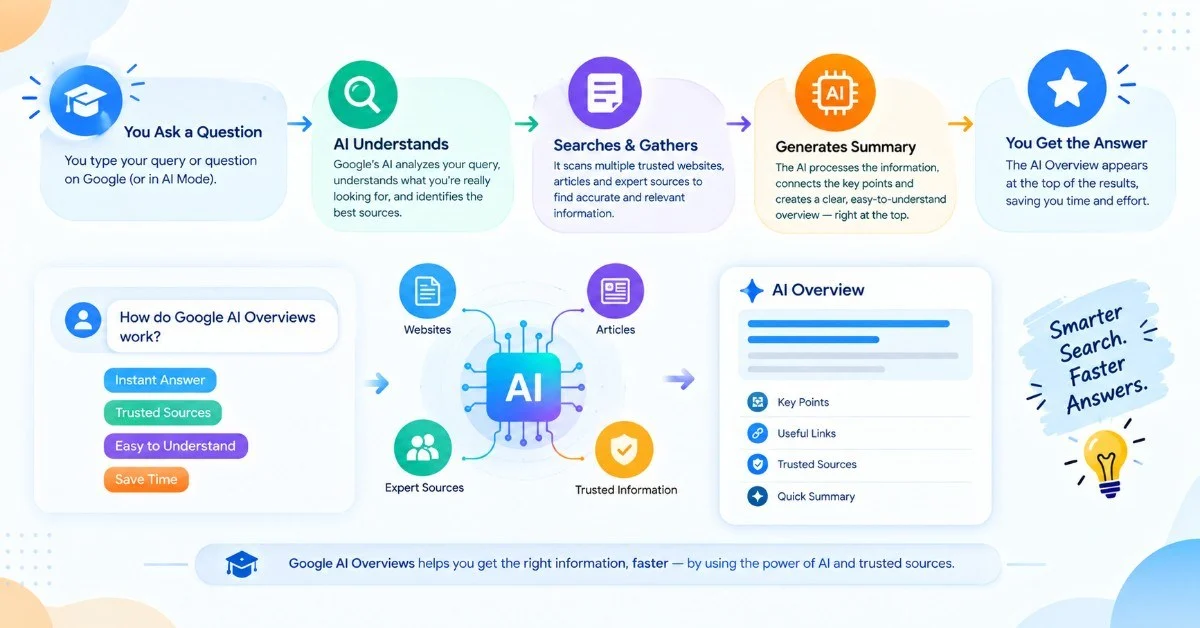
Google AI Overviews work in four steps: Google interprets your question, retrieves relevant pages, uses a Gemini-based language model to write a summary, and attaches links to the pages it used. If you wish to know how Google AI Overviews Work in simple language, here is the process that I explain to my team:
- Query understanding: Google works out what you mean, not just what you typed. “Best course after 12th commerce” and “what to study after commerce” land in the same neighborhood.
- Retrieval: Google’s ranking systems pull pages it considers useful and reliable for that question.
- Generation: A language model condenses those pages into one answer. It predicts fluent text. It does not “know” facts the way a teacher does, and that is where errors enter.
- Linking: Source links go beside the summary so you can check the work.
In case of complex queries, Google has the ability to divide your search into multiple searches and compile the results. This makes the answers seem more comprehensive compared to 2024.
The SEO angle students never hear
The pages an AI Overview cites are usually pages that rank well and answer a question directly. That is why publishers now put the answer in the first sentence of every section. Models lift clean, direct passages more easily than long, winding ones.
The Overview is as weak as the pages it draws from. If the best pages on your topic are slim, plagiarized, or created in order to market coaching services, the Overview is doomed to fail.
Write better questions, get better summaries
Specific questions produce better summaries than unclear ones.
- Weak: “marketing”
- Better: “difference between B2B and B2C marketing with two Indian examples”
- Weak: “best course”
- Better: “courses after 12th commerce without maths, India”
Add your level, your country, and the format you want.
Why Should Students Care? The Benefits of Google AI Overviews
Students should care because AI Overviews save real time on basic lookups, and they also change how you learn if you let them think for you. Start with the upside.
The main benefits of Google AI Overviews come down to four things.
Speed on low-stakes questions
An AI Overview answers definition-style questions in seconds. Full form of CUET? Steps to build a pivot table? You get a working answer without opening five tabs.
A map for unfamiliar topics
The summary gives you starting vocabulary when you know nothing about a subject. A fresher who has never heard of “supply chain analytics” gets the basic terms in one glance. Those terms become better searches.
Help in Hindi
AI Overviews can appear in Hindi as well as English for many users in India, which helps students who think in Hindi first. Language support keeps changing, so check what your own account shows.
Faster source discovery
The links beside the summary are often more valuable than the summary itself. I open the cited pages first and read the summary second. You find good sources quicker than scrolling through ten results.
Here is the point I want you to remember. Google AI Overviews for students work best as a warm-up. They are not the workout.
Takeaway: speed, orientation, language access, and source discovery are the wins. None of them replaces understanding.
Are Google AI Overviews Useful for Students?
Yes, AI Overviews are useful for students when the task is orientation, and risky when the task is a final answer, a citation, or a shortcut for exam preparation. Here is how I sort common student tasks:
| Task | Useful? | Why |
|---|---|---|
| Understanding a new term | Yes | Low risk, fast context |
| Comparing two concepts | Yes, with checking | Good starting frame |
| Finding exam dates or fees | Careful | Details change, so use the official site |
| Solving maths or accounting problems | No | Models slip on multi-step logic |
| Writing assignments | No | It weakens learning and risks plagiarism flags |
| Choosing a college | Partly | Fine for ideas, weak on cutoffs and fees |
| Interview preparation | Yes | Good for common concepts and questions |
One pattern I have repeatedly observed is that those students who consider the summary to be their first attempt at understanding do better than those who consider it their last.
Reading a neat summary feels like learning. Usually it isn’t. Google AI Overviews for students become a problem the moment recognition replaces recall.
Takeaway: after every summary, ask yourself: “Could I explain this to a friend without looking?” If not, you read it. You did not learn it.
How Accurate Are Google AI Overviews?
AI Overviews are often accurate on simple, well-documented topics and unreliable on recent, niche, or multi-step questions. Google has never claimed perfection and has made public fixes since launch.
Common Errors I See Most Often
- Outdated facts. Fees, cutoffs, syllabus, and dates change every year.
- Blended sources. The model merges two pages that disagree and serves one confident answer.
- Oversimplification. Nuance in law, medicine, or economics disappears.
- Mangled numbers. Percentages and formulas can come out wrong.
- Confident tone. The summary never says “I am not sure.” That is the dangerous part.
A five-minute accuracy test
Choose five subjects you are already very knowledgeable about. Look up all of them on the search engine. Compare your knowledge of those topics with the information provided in the Overview section. This will help you understand where the search tool excels and where it fails.
Takeaway: accuracy drops as topics get newer, narrower, or more numerical. Verify every date, number, and rule.
Should Students Trust Google AI Overviews?
Students can use AI Overviews to start research, never to finish it, and never as a citation. Your professor wants the original paper, book, or report. Here is the workflow I recommend to graduate students who use Google AI Overviews for their research projects:
- Scope. Use the Overview to learn the vocabulary of your topic.
- Harvest. Open the cited pages. Note authors, organisations, and study names.
- Go primary. Search those names in Google Scholar, your college library database, or government portals.
- Write in your own words. Cite the source, never the summary.
- Two reasons this matters. Many colleges run originality and AI-detection checks, and copied summary text can
- Trigger both. More importantly, a summary has no author, so it cannot support an argument.
Say you are writing about digital payments in India. The Overview mentions UPI transaction growth. Your job is to trace that figure back to the National Payments Corporation of India or the Reserve Bank of India, and cite them.
How Can Students Use Google AI Overviews at Each Stage?
Students get the most from AI Overviews by matching the tool to their stage: exploring options after 12th, scoping research in college, and preparing for work as a fresher.
If you are a 12th pass
Use the summary to explore courses, then verify everything on official pages. Ask: “What can I study after 12th with PCM other than engineering?” You could see concepts like defence services, architecture, or data science. Then check eligibility, entrance exams, and dates on the exam authority’s or college’s own website.
- Never trust cutoff numbers from a summary.
- Compare at least three colleges using their own sites.
- Write down exam names and research each one separately.
If you are a graduate student
Use it to decode jargon and find starting sources for assignments and dissertations. Ask for definitions and academic debates, then follow the links toward scholarly work.
- Search “[your topic] literature review” and see what the cited pages reference.
- Use follow-up prompts to narrow a broad topic.
- Keep a source log so nothing you write rests on the summary.
If you are a fresher
Use it to understand job roles, tools, and interview basics, and never to set salary expectations. Ask: “What does a junior data analyst do in a normal week?” Then read real job postings for the same role and compare.
- Pull skill keywords for your resume from actual listings.
- Practice explaining each concept aloud without notes.
- Treat salary figures as rough. City and company change them enormously.
Takeaway: the question decides the answer.
Are Google AI Overviews Free?
Yes, AI Overviews are free; they appear inside normal Google Search and need no subscription. You pay only for your internet data. Google sells paid plans that unlock more advanced AI features and higher limits in tools like Gemini. Those are separate products. Google has also run student offers on such plans in some regions, but offers expire and change, so check Google’s official pages for what applies to you today.
One practical rule: if a website asks you to pay to “unlock AI Overviews,” walk away. The real feature lives in Google Search and costs nothing.
Takeaway: start free. Pay only when a specific need justifies it.
Best AI Tools for Students: Where Google’s Options Fit
The best AI tools for students depend on the job: Google’s products cover quick answers, source-grounded study, and visual search, while other tools fill different gaps.
Beyond the summary box, these are the Google AI tools for students I would try first:
| Tool | Best for | Watch out for |
|---|---|---|
| AI Overviews | Fast orientation | Errors in dates and numbers |
| Gemini | Explanations, quizzes, practice questions | Can invent details |
| NotebookLM | Studying from your own notes and PDFs | Only as good as your uploads |
| Google Lens | Identifying diagrams, equations, objects | Explanations need checking |
| AI Mode | Complex, multi-part questions | Longer answers, more to verify |
Among the Google AI learning tools, I tell students to start with Notebook LLM. It answers from documents you upload, which cuts down on invented facts and lets you check claims against your own material.
Other AI search tools for students
Several AI search tools for students show cited sources beside their answers, and some chat assistants now include live web search. I will not pin names or prices here, because features and pricing shift every few months. Test any tool with a topic you already know.
Which AI search engine is ideal for students?
Not all engines can be called winners for all students; the best artificial intelligence search engine for students should give clear references to sources, update quickly, and allow checking the veracity of every statement within one click. You can use four criteria for evaluating these engines:
- Does it show links you can open?
- Is it appropriate for a subject you are familiar with?
- Does it admit uncertainty?
- Does it handle Indian exams and colleges correctly?
Use two or three different tools to answer the same five questions.Keep the one that survives your checking.
6 Mistakes Students Make With AI Overviews
AI Overviews can make studying faster, but they can also make it easier to stop thinking for yourself. Here are six common mistakes students make — and what to do instead.
- Copying the summary into your assignment: Don’t just copy and paste. Read it, close the tab, write what you remember in your own words, and then check your work.
- Trusting dates, fees, or other details without checking: Information can change or be wrong. Always double-check important details on the official website.
- Asking questions that are too unclear: Be specific. Tell AI your study level, country, subject, or the format you need so you get a more useful answer.
- Ignoring the links: The synopsis is not the whole story. Open at least two of the links and see where the information actually comes from.
- Using AI before trying the problem yourself: Give yourself a chance to solve it first. Next, utilise AI to verify your response or identify any errors.
- Avoiding difficult questions: Questioning is a normal process of learning. It makes your brain build a better memory of things. But if the AI always answers your problems in an elegant manner when things get tough, then you will lose out on the process of thinking.
Use AI as a study partner, not as a replacement for your own thinking.
How 99Eedu Institute Helps Students Improve Their SEO, AEO & GEO Rankings
99Eedu Institute helps students learn how to get their content found in three places: Google’s regular search results, the quick answer boxes at the top of the page, and AI-written summaries like Google AI Overviews.
Each place works a little differently, and that is where SEO, AEO, and GEO come in. SEO helps your page rank in the normal results. AEO helps your answer win the short box people read first. With GEO, your content is more likely to be selected and referenced when AI platforms generate summarized answers.
- SEO (Search Engine Optimization) is about earning a higher position in Google’s standard organic listings. It involves targeting the right search terms, publishing genuinely helpful content, and building credibility with both users and search engines.
- AEO (Answer Engine Optimization) is the practice of shaping your content so search engines and voice assistants select it as the quick, direct reply to a question.
- GEO (Generative Engine Optimization) aims to make AI-driven tools, such as Google’s AI Overviews, reference and cite your content as a source.
You don’t need to study everything at once. AEO and GEO build upon SEO. SEO helps you rank; AEO helps you win the quick-answer box; and GEO helps AI tools cite your content.
What we teach, step by step
We teach these skills by letting you practice on real content, not by asking you to memorize definitions. Every step below is something you actually do.
- Keyword research. You find out what people really type into Google. You also see why “best course after 12th commerce” pulls more of the right readers than a doubtful word like “education.”
- Answer-first writing. You learn to start each section with the answer, so readers get what they came for straight away. This post is written the same way.
- Search intent. You learn to spot what a searcher wants: to learn something, compare options, or buy. Then you write to match that need.
- Trust signals. You add your name, your sources, and the date you last updated the page. Readers and AI tools can then see your content is honest and checkable.
- Structure. You break your page into clear headings and short lists, so it is easy for a person to scan and easy for a machine to read.
- Checking results. Start by reviewing which pages rank well, which ones AI tools pull from, and which ones get passed over. Then improve the weak spots and test again.
You learn by publishing, checking the results, and improving, not by memorizing.
Who benefits most
These skills help anyone who wants their work to be found online, and three groups gain the most.
- 12th pass students who want to explore digital marketing as a career path.
- Graduate students who run blogs, projects, or portfolios and want people to find them.
- Freshers building skills to land a first job in content, marketing, or SEO.
If you want your work found, these skills are worth learning early.
About the Author
Year Ali (Yeash) is a Senior SEO & PPC Specialist and Digital Marketing Trainer at 99Eedu Institute, with over 10 years of experience tracking how Google’s search results change and what that means for real students and job seekers.
He has watched AI Overviews reshape how students research, revise, and prepare for interviews, and he trains hundreds of 12th pass students, graduates, and freshers to use these tools without falling for wrong dates, copied answers, or outdated facts.
His approach is simple: AI can speed up your learning, but it cannot replace it. Every session he runs at 99Eedu Institute pushes students to verify what they read, cite real sources, and think for themselves, because that is what actually helps in exams and interviews.
When he’s not training students, Yeash writes practitioner-first guides like this one, breaking down how tools like Google AI Overviews actually work and how students should use them.
Source: (LinkedinProfile).
People Also Ask
Q1. Are Google AI Overviews free?
Yes, AI Overviews cost nothing inside regular Google Search. You need no subscription or sign-up. Paid Google AI plans add extras in Gemini, but the overview on your results page stays free.
Q2. Should students trust Google AI Overviews?
Use them only for starting purposes and not as your final source. In one test taken in 2026, the accuracy level was found to be about 91%. There were also many correct answers where the pages quoted did not fully support the answer.
Q3. Can students use Google AI Overviews for research?
Certainly, as a way of scoping a topic but not as a source of citation. Read through the overview and note down keywords; then visit the links and get your information from the original document.
Q4. What type of AI is ChatGPT?
ChatGPT is a conversational AI tool powered by a large language model (LLM) architecture.It writes text by predicting likely words from patterns in huge datasets. That helps it explain and draft, but it can also state incorrect facts.
Q5. Why do we need an AI Overview?
You don’t strictly need one, but it saves time on quick lookups. It gives a fast summary with source links, so you can get oriented before reading full pages. Use it as a shortcut, never a replacement for research.
Q6. What does Google AI give you?
Google AI gives you summaries, conversational answers, and study help. That includes AI Overviews in Search, Gemini chat, AI Mode for bigger questions, and NotebookLM for studying from your own notes and PDFs.
Q7. Is AI 100% trustworthy?
No, no AI is 100% trustworthy. It can sound confident while being wrong, mix up sources, or use outdated data. Check every important claim against an official or primary source before you rely on it.
Q8. What are the top 3 most-used AIs?
ChatGPT, Google Gemini, and Microsoft Copilot are commonly named among the most widely used AI assistants. Rankings shift often and depend on how usage is measured, so check a recent report before quoting them.
Q9. Can an AI Overview be wrong?
Yes, an AI Overview can be wrong. It may blend pages that disagree, rely on old information, or garble numbers. Google’s early glue-on-pizza answer is the famous example. Always verify before you act.
Ready to plan your next step?
Book a free counselling session with 99Eedu Institute and bring your questions, your doubts, and the AI answers you are unsure about. We will check them with you.
Share on:

Quick Enquiry
Please fill up the form and we will get back to you in next 12 hours!
